Cutting the cord has never been easier — and at the center of that shift is IPTV live streaming. Unlike traditional cable or satellite, IPTV delivers live television over the internet using IP networks, letting viewers watch real-time channels and events on smart TVs, phones, or streaming boxes. Whether you are a die-hard sports fan wanting multi-angle views, an expat looking for international channels, or a cord-cutter seeking cost-effective entertainment, understanding the technology behind your screen is essential.
In this comprehensive guide, we will explore the technical basics of how IPTV works, how live streams are delivered across the globe, the devices you need, and the pros and cons of the technology. We will also cover crucial legal and security considerations, provide a practical IPTV setup guide, and share actionable tips to optimize your viewing experience. Let’s dive into the world of internet protocol television.
What is IPTV?
IPTV stands for Internet Protocol Television. Simply put, it is a system where television services are delivered using the Internet Protocol suite over a packet-switched network such as a LAN or the internet, instead of being delivered through traditional terrestrial, satellite signals, or legacy cable formats.
To understand IPTV live streaming, it helps to distinguish it from other IPTV formats. Video on Demand (VOD) lets you watch movies or shows whenever you want (like Netflix), while time-shifted TV allows you to replay recently aired broadcasts. Live TV streaming, however, broadcasts television programs in real-time as they happen.
The rise of IPTV is closely tied to the explosion of high-speed broadband and the cord-cutting movement. Consumers grew tired of rigid cable packages and expensive proprietary hardware. Internet protocol television offered a flexible, software-based alternative. For example, watching a live sports match on traditional broadcast relies on continuous radio frequency signals or satellite beams. With IPTV, that same match is broken down into digital data packets and sent through your home router, allowing you to pause, rewind, or watch on your smartphone while commuting.
Core Components of an IPTV System
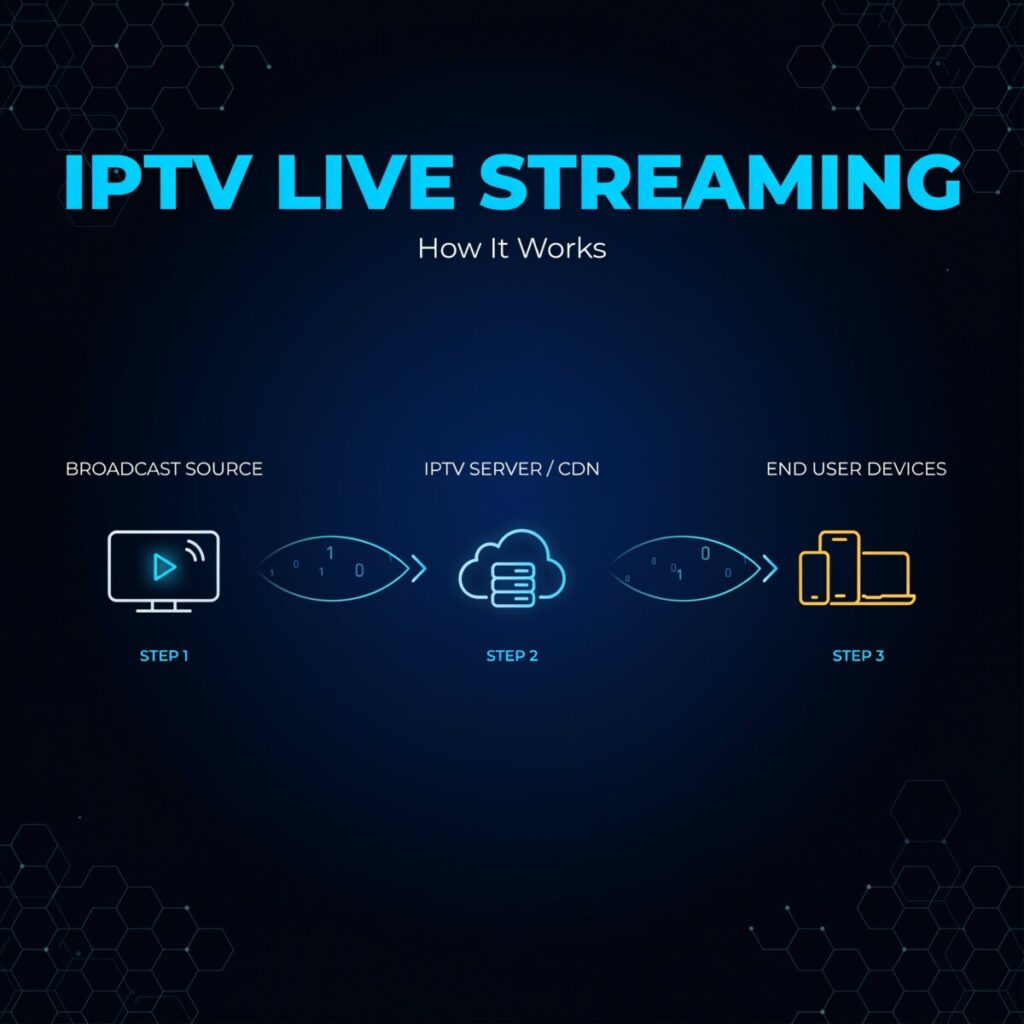
Building an IPTV ecosystem requires several interconnected layers, moving from the content creator to the end viewer.
- Content Sources: The journey begins with the raw video feed. This could be a live studio broadcast, a sports event feed via satellite, or pre-recorded media. These feeds are sent to a streaming encoder.
- Encoding and Transcoding: Raw video files are massive. A streaming encoder compresses the video using codecs like H.264 (AVC) or the more efficient H.265 (HEVC). Video transcoding then takes that single encoded stream and creates multiple versions at different bitrates and resolutions (e.g., 1080p, 720p, 480p) to accommodate varying internet speeds.
- Media Servers and Streaming Protocols: The transcoded streams are hosted on a streaming server. Historically, RTMP was used for ingest, but today, HTTP-based protocols dominate delivery. HLS (HTTP Live Streaming) and MPEG-DASH are the industry standards for delivering video chunks to viewers. For ultra-low latency streaming applications, WebRTC is increasingly utilized.
- CDN / Distribution Layer: To prevent the origin server from crashing under heavy traffic, a CDN for streaming is used. Edge servers cache the video segments geographically closer to the viewers, ensuring fast delivery and reducing buffering.
- Middleware and EPG: This is the “brain” of the user interface. Middleware handles user authentication, billing, and channel authorization. It also powers the Electronic Program Guide (EPG), which provides the interactive channel lists and TV schedules. It is also where DRM for IPTV (Digital Rights Management) is implemented to protect licensed content from unauthorized redistribution.
- Player / Client Apps: Finally, the end-user needs a way to decode and display the video. This happens via IPTV apps on smart TVs, set-top boxes, or web players.
How Live IPTV Streaming Works — Step-by-Step
Understanding the pipeline from camera to screen demystifies how IPTV works. Here is the step-by-step workflow:
Step 1: Capture and Ingest. A camera or satellite feed captures the live event. This raw signal is sent via SDI, HDMI, or IP to a hardware or software streaming encoder. The ingest server receives this high-quality feed.
Step 2: Encode and Transcode. The encoder compresses the video. The transcoder then utilizes adaptive bitrate streaming (ABR) technology to generate a “ladder” of streams. If your internet connection fluctuates, ABR allows the player to seamlessly switch from a 1080p stream to a 720p stream without stopping the video.
Step 3: Segment and Package. Unlike traditional downloads, IPTV streams are chopped into tiny segments (usually 2 to 10 seconds long). These segments are packaged into manifest files—such as .m3u8 for HLS or .mpd for DASH. These text files act as an index, telling the video player where to find each segment and what bitrate options are available. (This is where the debate of HLS vs DASH comes into play; both achieve similar ABR results, but HLS is natively supported by Apple, while DASH is an open international standard).
Step 4: Distribute via CDN. The segments and manifest files are pushed to the CDN. When a user in London requests a live stream originating in New York, they pull the data from a local London edge server rather than the New York origin server. This drastically reduces latency and server load. It is worth noting the difference between multicast vs unicast here: traditional IPTV on private telecom networks often uses multicast (sending one stream to many users simultaneously on a local node), whereas public internet streaming relies on unicast (sending an individual stream to each user).
Step 5: Playback. The client app requests the manifest file. The player reads the available bitrates, measures your network speed, and downloads the appropriate segments into a buffer. As segments play, the player continuously fetches the next ones, adapting the quality in real-time.
To address the inherent delay in this process, engineers use low latency streaming protocols. Techniques like LL-HLS (Low-Latency HLS) and CMAF (Common Media Application Format) reduce the segment size and use chunked transfer encoding to bring the delay down to just a few seconds, bridging the gap between traditional broadcast and IP streaming.
Devices and Apps Used for IPTV Live Streaming
One of the biggest advantages of IPTV is hardware flexibility. Viewers are no longer tied to a proprietary cable box.
- Smart TVs: Most modern TVs running Android TV, Tizen (Samsung), or webOS (LG) have native app stores where you can download IPTV apps.
- Streaming Boxes: Devices like the Nvidia Shield, Apple TV, Amazon Fire Stick, and generic Android TV boxes are incredibly popular. They offer powerful processors capable of handling 4K video transcoding and smooth interface navigation.
- Set-Top Boxes: Dedicated IPTV set-top box hardware, such as MAG boxes or Enigma2 receivers, are heavily favored by enthusiasts. They connect directly to the router via Ethernet and are optimized specifically for decoding IPTV streams and managing massive M3U playlist files.
- Mobile and Web: iOS and Android smartphones allow you to watch on the go. Web players built on HTML5 allow users to watch directly from a browser without installing additional software.
- Middleware Formats: Many consumer setups rely on portal URLs or an M3U playlist file. An M3U playlist is a simple text file containing the URLs of all the live streams and EPG data, which is loaded into frontend applications like TiviMate, IPTV Smarters, or Kodi.
Benefits of IPTV Live Streaming
The shift from legacy cable to internet protocol television offers massive advantages for both providers and consumers.
- Flexibility and Multi-Device Support: You can start watching a live news broadcast on your living room TV and seamlessly continue on your tablet in the kitchen.
- Advanced Features: IPTV naturally integrates with digital features like catch-up TV, cloud DVR, and start-over functionality. For live sports, multi-view options allow you to watch four different camera angles or simultaneous matches on one screen.
- Cost Savings and Scalability: For providers, IPTV is highly scalable. Adding a new channel or a new subscriber doesn’t require laying new physical cables; it just requires server bandwidth. For consumers, it often means paying only for the channel packages they actually want.
- Niche and International Content: IPTV excels at delivering hyper-specific niche content and international channels that local cable providers simply cannot offer due to geographical broadcast restrictions.
Risks, Limitations & Legal Considerations
While the technology is revolutionary, navigating the IPTV landscape requires caution.
- Legality and Piracy: The term “IPTV” itself is completely legal. Major corporations like Hulu + Live TV, YouTube TV, and Sling TV are technically IPTV services. However, the internet is flooded with unlicensed, cheap subscriptions offering thousands of premium channels. This is IPTV piracy. Using unverified services violates copyright laws, and providers can be shut down at any time, leaving you with no service and no refund. When researching the best IPTV providers, always verify their official broadcasting licenses.
- Reliability: Because live TV streaming relies entirely on your internet connection, it is vulnerable to packet loss and bandwidth congestion. If your ISP throttles your connection or your local node is congested, you will experience buffering. Furthermore, ISPs frequently use DNS blocking to shut down access to known pirate IPTV servers.
- Security and Privacy: Unverified IPTV providers often lack secure streaming protocols. Entering your credit card details or personal information into a shady portal exposes you to data theft.
- Advice: Always verify the licensing of a provider. Use reputable, legal services. If you are accessing legitimate services while traveling, using a VPN can protect your privacy, but be aware that some providers block VPN IP addresses to enforce regional blackout restrictions.
How to Set Up IPTV Live Streaming at Home — Quick Guide
Setting up a legal IPTV live streaming system at home is straightforward if you have the right equipment and a legitimate provider.
- Required Equipment: You need a stable broadband connection (at least 25 Mbps for multiple streams), a modern router, and a compatible device (Smart TV, streaming box, or MAG box).
- Step 1: Choose a Provider. Subscribe to a legitimate live TV streaming service or a verified, licensed IPTV provider.
- Step 2: Obtain Credentials. You will receive either an app to download, a portal URL and MAC address activation code (for MAG boxes), or an M3U playlist URL / Xtream Codes API login.
- Step 3: Configure the App/Device. If using a Smart TV or streaming box, download a reputable frontend app. Enter your M3U URL or API credentials. If using a MAG box, enter the portal URL provided by your service into the network settings.
- Step 4: Test and Tweak. Load the EPG and test a few live channels. If you experience stuttering, log into your router and enable QoS (Quality of Service) to prioritize streaming traffic. You may also need to increase the network buffer in your player app’s settings or change your DNS servers to a public provider like Cloudflare or Google DNS to bypass local routing hiccups.
Tips to Optimize Live Streaming Quality
To ensure a buffer-free, crystal-clear experience, implement these buffer and bitrate optimization strategies:
- Network Hardware: Always prioritize a wired Ethernet connection over Wi-Fi for your IPTV set-top box or streaming device. If you must use Wi-Fi, ensure you are on a 5GHz band and upgrade to a Wi-Fi 6 router if possible.
- Speed Requirements: For standard 1080p HD streaming, you need 5–8 Mbps per stream. For 4K UHD, aim for 15–25 Mbps per stream. If multiple people are watching simultaneously, ensure your total bandwidth covers the aggregate requirement.
- Player Settings: Dive into your app settings and enable hardware acceleration (often called “ExoPlayer” or “Hardware Decoder” on Android). This offloads the video processing from the CPU to the GPU. You can also manually increase the buffer size in the app settings; a larger buffer takes longer to start the stream but prevents mid-playback buffering.
- Provider Checks: Ensure your provider utilizes a robust CDN and supports adaptive bitrate streaming so the video quality can dynamically adjust to network hiccups.
Future Trends in IPTV Live Streaming
The landscape of internet protocol television is evolving rapidly. Low latency streaming is at the forefront, with protocols like LL-HLS, CMAF, and WebRTC pushing delays down to sub-second levels, which is critical for live sports betting, real-time gaming, and interactive broadcasting.
Edge computing and AI are also transforming the backend. AI-driven per-title encoding analyzes the complexity of a live video feed in real-time, optimizing bitrate allocation to save bandwidth without sacrificing quality. Furthermore, QoE (Quality of Experience) monitoring allows providers to detect and fix stream degradation before the user even notices.
On the consumer side, expect highly personalized and interactive live experiences. We are already seeing the integration of live shopping overlays during broadcast events, real-time statistics in sports, and multi-angle viewer control, blurring the line between passive viewing and interactive media.
Conclusion
IPTV live streaming has fundamentally disrupted the traditional broadcasting model, offering unprecedented flexibility, cost savings, and advanced features like catch-up TV and multi-device support. By understanding the core components—from the streaming encoder to the CDN and the client app—you can better troubleshoot issues and optimize your home network. However, always prioritize IPTV legality by choosing licensed providers to ensure secure streaming, reliable service, and high-quality video transcoding.
Have you made the switch to internet protocol television, or are you still weighing the pros and cons of cord-cutting? Drop a comment below with your experience, test out our setup tips, and subscribe to our newsletter for more in-depth streaming guides!
Frequently Asked Questions (FAQ)
Is IPTV legal?
Yes, the technology itself is 100% legal. Services like YouTube TV, Hulu + Live TV, and Sling TV use IPTV. However, subscribing to unverified services offering thousands of premium channels for a few dollars a month is illegal piracy. Always choose licensed providers.
What internet speed do I need for IPTV?
For a single 1080p HD stream, you need a minimum of 5–8 Mbps. For 4K UHD content, 15–25 Mbps is recommended. If you have multiple streams running simultaneously or other devices downloading files, a 100+ Mbps connection is ideal to prevent buffering.
How to reduce buffering on IPTV?
To reduce buffering, use a wired Ethernet connection instead of Wi-Fi, enable QoS on your router to prioritize streaming traffic, increase the buffer size in your IPTV app settings, and ensure your provider supports adaptive bitrate streaming.